Export Firestore data without building your own tooling.
Firestore2Excel helps you browse root collections, filter the records you want, and export clean data to Excel-compatible XML or CSV from one lightweight desktop app.
- Browse Cloud Firestore collections from a desktop interface
- Preview documents before exporting
- Filter records by text fields and dates
- Export one collection or several collections
Focused on one job: getting Firestore data out cleanly.
This is not a generic admin dashboard. Firestore2Excel is built for fast data extraction, operational review, and export tasks that usually end up in ad hoc scripts.
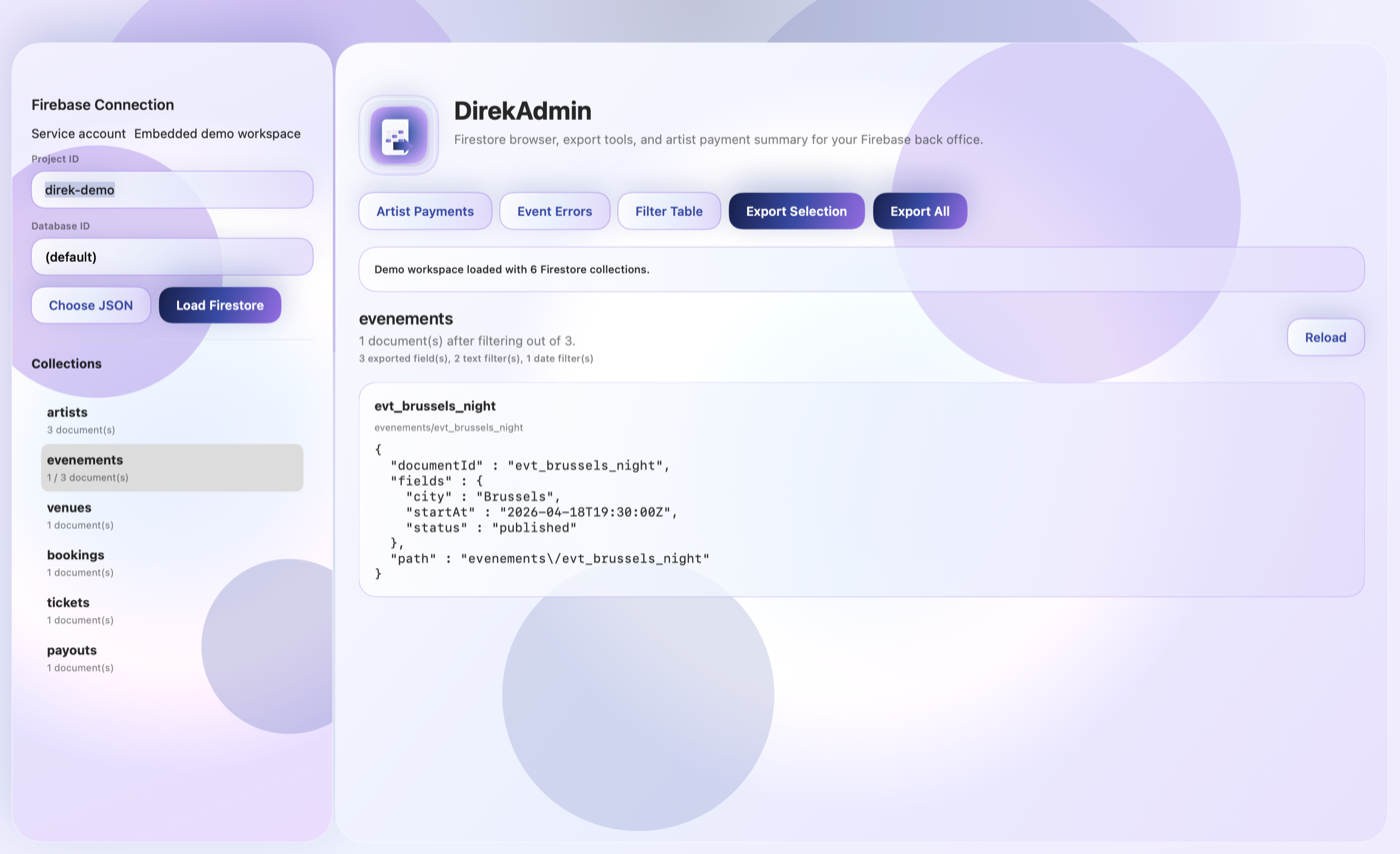
What the app looks like in use.
The workflow stays close to the data: load a Firestore workspace, preview documents, apply filters, then export what you need.

Firestore2Excel is designed for developers, operators, and small teams who need a fast way to extract Firestore data without maintaining custom scripts for every request.
The app works with a local Google service account credential so you can keep access explicit and controlled while working directly from macOS.
Support and privacy pages are ready too.
If you are setting up App Store Connect metadata, use the support page as your Support URL and this page as your Marketing URL.